


Sippd Coffeely
0.00.00 Reviews
App Specs
- Version
- 1.1.5
- Updated On
- License
- Free
- Downloads
- 10,000+
- Developer
- NathanPham
- Categories
- Food & Drink
- Platform
- Android
Screenshots
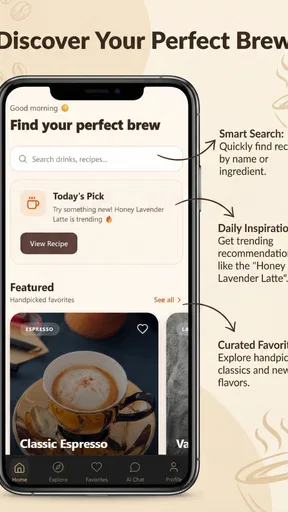
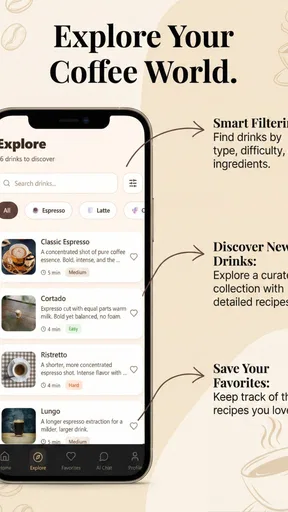
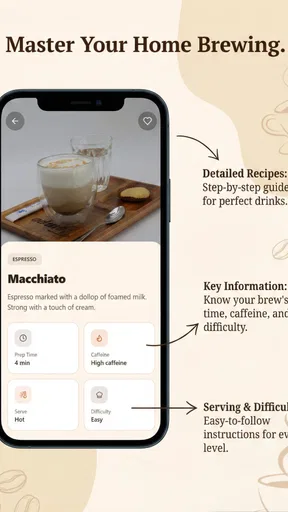
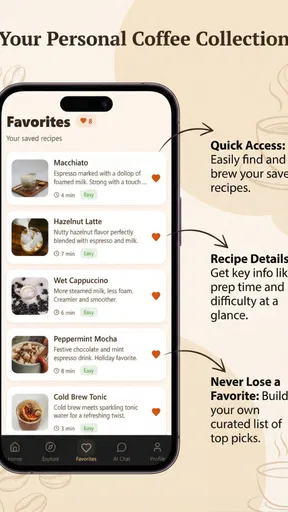
 Analysis by AppCompare
I approached Sippd Coffeely as the kind of coffee companion I would keep nearby during a normal morning rather than as a replacement for a full recipe book. Its appeal is easy to understand: it brings coffee discovery, brewing timing, personal recipes, and an AI assistant into one food-and-drink app. That combination makes it more practical than a simple countdown timer, while still feeling more focused than a broad cooking platform.
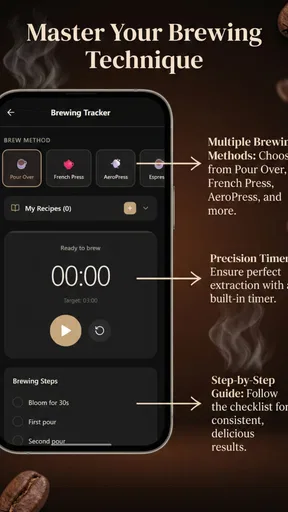
My overall impression is that the app is aimed at people who enjoy making coffee deliberately but do not want to manage a complicated system. The interactive timer gives a brewing session some structure, custom recipes make repeated preparation easier to organize, and the assistant offers a more conversational way to explore ideas. Those parts work best together, because each solves a different small problem: deciding what to try, remembering how to make it, and staying on track while brewing.
It is a free app from NathanPham, with optional in-app purchases ranging from ten cents to just under ten dollars per item. The Everyone age rating makes it approachable for a wide audience, and its Android compatibility reaches back to version 7.0. The current release is version 1.1.5, and the app has passed the early discovery stage with over ten thousand installs. I would still judge it primarily by how well it fits my coffee routine, because a useful brewing tool needs to feel dependable at the exact moment I am preparing a drink.
How it feels during a normal brewing session
I find a normal brewing session is most useful when I decide what I’m making before the kettle is on: that keeps recipe choices and timing from competing with the pour. In this section, I’d look at how the app’s focused coffee workflow fits into an ordinary morning, and where a little preparation makes it feel smoother.
A focused start instead of a crowded dashboard
The first strength of this app is its clear purpose. I do not open it to browse unrelated recipes, track groceries, or plan an entire menu. I open it because I want help with coffee. That narrow focus matters when I am standing in the kitchen with a kettle, beans, and limited patience. A timer that is designed around brewing feels more relevant than the generic clock app already installed on a phone.
The interactive approach also changes how I think about timing. A basic countdown can tell me when to stop, but a brewing-oriented timer is more useful when I need to pay attention to stages or repeat a method consistently. I would use it when experimenting with a pour-over recipe, trying to make two cups taste similar, or simply avoiding the common problem of losing track of time while preparing breakfast.
There is a subtle trade-off here. A dedicated coffee app can be more helpful than a general timer only when I am willing to engage with the brewing process. If I just need a quick alarm for a tea bag or a rough steeping period, opening a specialized app may feel like extra effort. The value appears when the recipe and timing are connected, not when the task is too simple to need guidance.
Worth Reading Before You Choose

Flipboard Shows What News Apps Must Do Beyond the Feed

Switching to Android Auto Means Rethinking Your Driving Routine

Google Calendar Makes a Crowded Week Easier to Manage

Ludo King Makes the Most of the Minutes Between Plans

Baby Panda World Brings Quick Play to Modern Phones, but Its Game Library Feels Busy

ESPN’s Live Game View Makes Following Close Games Easier
Custom recipes are most useful as a memory system
The custom recipe feature is not only for ambitious coffee hobbyists. I see its practical value in recording the small adjustments that are easy to forget: a slightly different grind, a slower pour, a changed dose, or a timing variation that produced a better cup. Even without treating the app like a formal tasting journal, saving a recipe can prevent me from starting over every time I want to recreate a drink.
My preferred workflow would be to begin with one repeatable recipe rather than entering a large collection immediately. I would make a cup, adjust one variable, and save the version that works. That approach keeps the recipe area useful instead of turning it into a pile of nearly identical entries. It also makes the app more valuable over time, because the stored instructions reflect my own equipment and preferences rather than an abstract ideal.
A realistic morning example would be a weekday cup made before work. I could select a saved recipe, start the timer, and follow the stages without checking a separate note or trying to remember yesterday’s sequence. If the result is too weak, I could revise that recipe after the session instead of relying on memory. This is a small convenience, but it is exactly the type that can make a tool worth reopening.
The AI assistant needs a sensible role
The AI assistant is an interesting addition, but I would treat it as a brainstorming partner rather than an authority. It can make the app feel more approachable when I am unsure what to try or want to think through a recipe. For someone new to brewing, conversational guidance may be less intimidating than searching through technical coffee discussions.
At the same time, coffee results depend heavily on details outside the app, including the beans, grinder, water, brewer, and personal taste. An assistant cannot remove those variables. I would use its suggestions as starting points, then make small changes and record what actually works in the custom recipe area. That combination is more reliable than accepting every recommendation without testing it.
This creates one of the app’s more useful but less obvious workflows: ask for an idea, turn the workable version into a personal recipe, then use the timer to repeat it. The assistant is most valuable at the beginning of that process, while the saved recipe becomes more important afterward. Users who expect the AI to produce a perfect cup automatically may be disappointed; users who want help exploring options are more likely to appreciate it.
What happens when the app is used repeatedly?
Repeated use is where I would expect the app to prove itself. A coffee tool does not need to be opened once for a novelty session; it needs to remain convenient after the novelty fades. The combination of saved recipes and an interactive timer gives it a reason to return, especially for people who rotate between a dependable daily drink and occasional experiments.
For heavier use, I would keep the workflow simple: choose a recipe before handling hot water, start the timer only when the brew begins, and avoid editing a recipe in the middle of the pour. That is not a limitation unique to this app; it is a practical way to reduce distractions around a hot kettle. The less I need to tap while brewing, the more useful the timer becomes.
The app also makes sense for comparing small changes across several sessions. Instead of changing grind, water, and timing all at once, I could save a base recipe and adjust one part at a time. That turns the phone into a lightweight experiment log. It will not replace specialist coffee notebooks for people who document every tasting detail, but it offers a more accessible middle ground between memory and a formal record.
Stability matters more than visual novelty
For this type of app, perceived speed is less about demanding graphics and more about whether the main action is ready when I need it. I expect the timer screen and recipe selection to feel immediate enough for a kitchen routine. The app’s concept is comparatively focused, so I would not want a long path through unrelated screens before starting a brew.
The most important reliability test is continuity during a session. A timer is only useful if it remains understandable while I move between pouring, weighing, and checking the cup. I would also want the current recipe context to be clear, because confusion between two similar saved recipes could be more frustrating than having no digital assistance at all.
My advice is to prepare the recipe before beginning the brew rather than treating the phone as something to configure mid-pour. That habit reduces the chance of accidental taps and keeps the app in a supporting role. It also gives a fairer impression of its speed: the app is helping with a planned process, not being asked to solve every decision at the last second.
Recovery after interruptions
Real kitchens are not controlled environments. Someone may ask a question, a delivery notification may appear, or I may need to put the phone down while handling equipment. That makes recovery an important part of the experience, even though it is easy to overlook when judging a coffee app from its feature list.
I would approach interruptions conservatively. Before starting, I would check that the selected recipe is correct and keep the phone positioned where I can glance at it without touching it unnecessarily. If I leave the brewing screen, I would return to the app before continuing rather than assuming I remember the exact stage. This is especially important when a recipe depends on several timed actions.
The app is therefore better suited to users who want guided consistency than to people who expect a completely hands-off appliance experience. It supports the brewer, but it does not remove the need to pay attention. That distinction is healthy: coffee preparation still involves judgment, and the timer should not encourage careless handling of hot water.
Older Android devices and practical constraints
Support for Android 7.0 gives the app a broad potential device range, which is useful for people who keep an older phone in the kitchen. A spare handset can be a sensible brewing companion because it avoids exposing a primary phone to splashes or coffee grounds. The app’s food-and-drink focus also makes that use case feel natural rather than improvised.
Older hardware can still change the experience. Even when an app supports an older operating system, the phone may have a smaller display, slower app switching, or a battery that is no longer dependable. I would not judge the app solely by whether it launches on an older device; I would also consider whether the screen is easy to read from the counter and whether the phone can remain available through a full brewing routine.
On a newer phone, the main advantage is likely convenience rather than visual spectacle. This is not an app I would choose for graphics-heavy entertainment. Its resource demands should be understood in the context of what it does: timing, recipe handling, and an AI interaction. The assistant may be the part that deserves the most patience, while a basic timer should feel like the lighter part of the experience.
There are also practical device choices to make. A phone with a bright, readable screen is preferable to one placed flat beside a kettle. A stand is more useful than repeatedly picking the device up, and keeping the display clean matters when hands are wet or covered with coffee residue. These details are not app features, but they determine whether the app feels helpful in daily use.
Where it beats ordinary alternatives
Compared with the standard clock timer, this app has a stronger connection between timing and coffee preparation. A generic timer is faster for a one-off task, but it does not naturally preserve the recipe context or help me develop a repeatable method. If I am trying to improve consistency, the specialized approach is more meaningful.
Compared with a traditional recipe note, the interactive timer is the clear advantage. Notes are excellent for storing information, but they do not actively guide a session. I can write down a recipe in a notes app, yet I still need to translate those instructions into a separate timer. Keeping those elements together reduces friction.
Compared with a broad recipe platform, the focused coffee scope is both a benefit and a limitation. I would choose this app when I want brewing help, not when I want dinner ideas or a complete meal planner. A general cooking app may be better for someone whose interest is food overall, while this one makes more sense for a user who repeatedly prepares coffee and wants a dedicated routine.
Compared with a specialist coffee journal, the app appears more approachable. A serious enthusiast may still want extensive tasting fields, bean inventory, equipment tracking, or detailed measurements. Someone who simply wants to save useful recipes and receive occasional guidance may prefer the lighter workflow here. The right choice depends on whether coffee is a daily habit to simplify or a hobby to document in depth.
Who should use it, and who should pass?
I would recommend this app to people who are moving beyond instant coffee or improvised brewing but do not want a steep learning curve. It is also a good fit for anyone who repeatedly forgets the timing of a recipe, enjoys trying small variations, or wants a single place for coffee ideas and saved instructions.
It could be especially useful in shared households. One person can create a recipe that another person follows without needing a verbal explanation every morning. That does not guarantee identical results, because technique still matters, but it gives everyone the same starting point. The app can act as a shared reference rather than a private collection of notes.
I would skip it if I only need a one-button stopwatch, dislike interacting with an AI assistant, or already have a detailed coffee journal that handles every part of my routine. I would also avoid relying on it as the only source of brewing knowledge. The best results will come from combining its guidance with observation: taste the coffee, notice what changed, and update the recipe accordingly.
Costs, access, and everyday value
The free entry point makes it easy to test whether the workflow suits me before committing to it. Optional purchases from ten cents to just under ten dollars per item mean that I would pay attention to which parts of the experience are optional before building the app into my routine. I would not purchase anything simply because it appears during an experiment; I would first decide whether the feature solves a recurring problem.
That pricing structure also affects who gets the most value. A casual user may be satisfied with the basic coffee routine, while a frequent brewer might find an optional addition worthwhile if it improves recipe exploration or saves time. The important question is not whether the app has paid items, but whether the free experience already supports the specific habit I want to build.
The Everyone rating makes it suitable for a household device, although younger users should still be supervised around hot water and brewing equipment. The app can guide timing, but no software can make a kettle or freshly brewed coffee safe to handle carelessly. I see it as a planning and consistency tool, not a substitute for kitchen awareness.
My performance verdict after looking at the complete workflow
The strongest part of Sippd Coffeely is the connection between discovery, personal recipes, and active timing. Each feature has a distinct job, and the app makes the most sense when I use them as a sequence rather than as isolated extras. I can explore an approach, save what works, and return to it when I want a repeatable cup.
Its limitations are equally clear. A specialized app can feel unnecessary for very simple brews, and the AI assistant should not be treated as a guarantee of better flavor. Older devices may be perfectly adequate for the supported operating system while still being less comfortable for multitasking or reading from across a kitchen. Users who need deep coffee analytics may also outgrow the lighter recipe approach.
Still, I think the app earns its place for the right audience. It is free to start, focused on a real daily habit, and more useful than a bare timer when I am trying to make coffee consistently. NathanPham has positioned it as a practical companion rather than an all-purpose cooking service, and that focus is its main advantage.
My recommendation is to begin with one everyday recipe, use the timer without overcomplicating the session, and treat the assistant as a source of ideas. After a few brews, the saved recipe should tell me whether the app is genuinely improving my routine. If I want a friendly coffee tool that helps me remember what works while keeping the brewing process organized, Sippd Coffeely is worth trying. If I want only a stopwatch or a professional-grade tasting database, a simpler or more specialized alternative will probably suit me better.
Pros
- Personalized coffee recommendations help match drinks to your taste.
- Useful discovery tool for exploring cafés and new coffee options.
- Simple interface makes browsing and saving coffee choices convenient.
- Can help compare nearby coffee spots before deciding where to go.
- Suitable for both casual coffee drinkers and enthusiasts.
Cons
- Recommendations may feel limited in areas with few listed cafés.
- Some features may depend on accurate location permissions.
- Coffee listings and menus can become outdated without regular updates.
- The app may be less useful if you already have a favorite café.
- Availability and features may vary between Android and iOS.
FAQs for Sippd Coffeely
What is Sippd Coffeely and what can I use it for?
Sippd Coffeely is designed for coffee lovers who want a convenient way to explore coffee-related information, discover drinks, and keep their preferences organized in one place. Depending on the available features and your location, the app may help you browse coffee options, learn more about flavors or preparation styles, and find relevant cafés or products. Its usefulness is greatest if you regularly try new coffees or want a simple digital companion for your coffee routine.
Is Sippd Coffeely free to download and use?
The app may be available to download at no initial cost, but some features, content, memberships, or purchases could require payment. Before installing, check the current Google Play Store or Apple App Store listing for pricing, subscriptions, and in-app purchase details. It is also worth reviewing the renewal terms carefully, especially if the app offers a trial period, because subscriptions can renew automatically unless canceled through your device’s account settings.
Does Sippd Coffeely require an account or personal information?
Some functions may work without registration, while personalized tools, saved preferences, order-related features, or synchronization between devices may require an account. During setup, the app could request information such as an email address, location, or notification permission. Before agreeing, review the privacy policy and permission requests so you understand how your data may be collected, stored, and used. Only provide information that is necessary for the features you intend to use.
Can I use Sippd Coffeely on both Android and iPhone?
Availability can vary depending on the developer, country, and operating-system version. Check the official Google Play Store listing for Android compatibility and the Apple App Store listing for iPhone or iPad support before downloading. Keep your device updated and confirm that you have enough storage space. Certain features may also behave differently across platforms, particularly those involving notifications, location services, payments, or integration with other apps.
What should I check before downloading Sippd Coffeely?
Before downloading, verify that the app is published by the official developer and read recent user reviews rather than relying only on promotional screenshots. Check the last update date, required permissions, supported Android or iOS versions, privacy information, and any subscription costs. If the app uses location, camera, notifications, or account access, decide whether those permissions are appropriate for you. Downloading only from the official app stores is the safest option.


